Create a Project
A MOVO AI Project is the persistent workspace for one video, campaign, or series. Everything you produce inside it — assets, script, generated clips, and final video — stays together and reuses the same visual and production context.
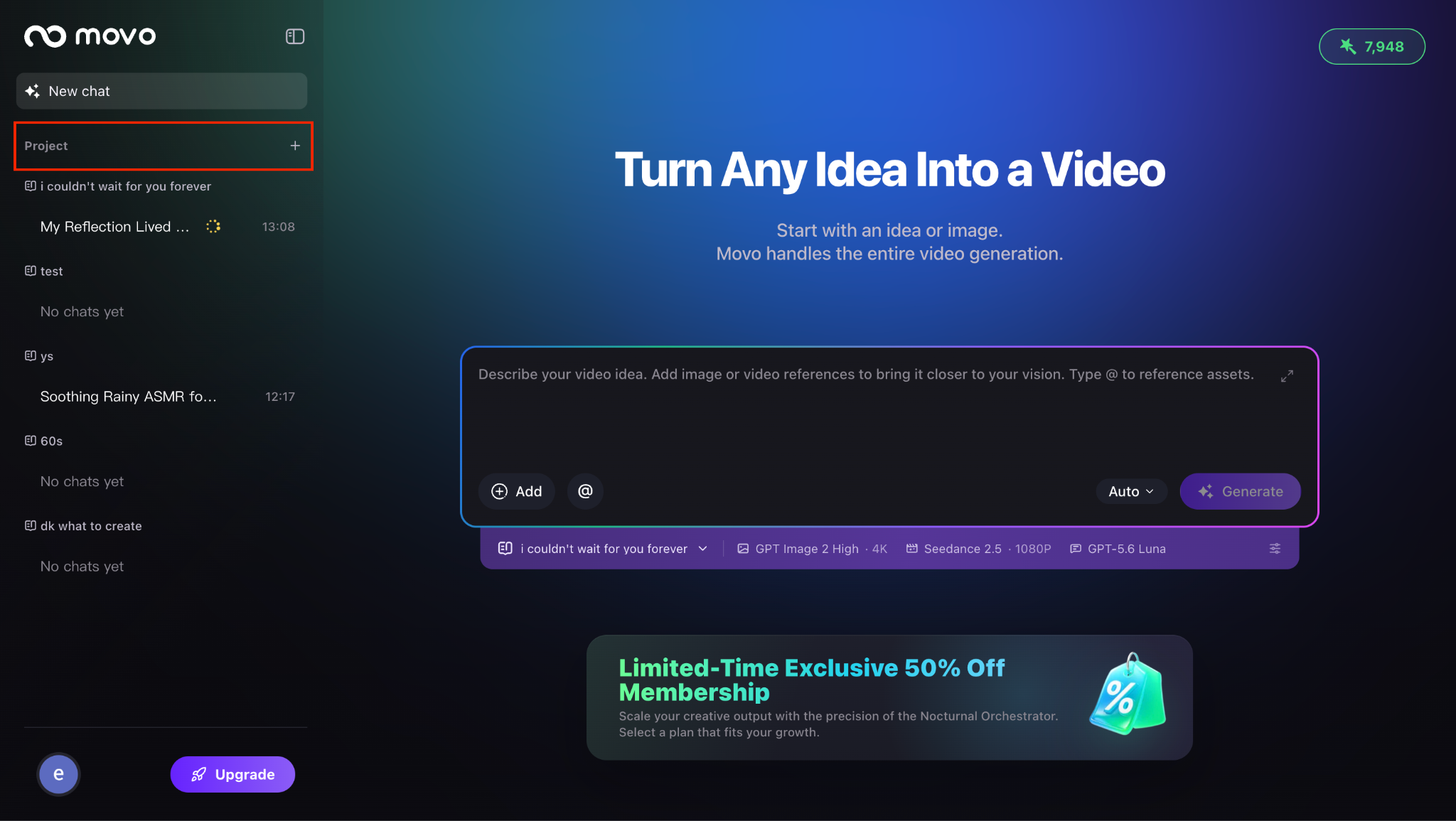
Step 1 · Click the [+] button beside Project
In the left sidebar of your workspace, click the [+] button next to the word Project. A new Project entry appears in the sidebar, ready to be named.
Step 2 · Name your Project
Enter a clear, descriptive Project name and confirm. If you leave the field blank, MOVO AI will save it as Untitled Project — usable, but harder to find later when your workspace grows.
Naming tips that scale
- Include the format or platform — Summer fragrance ad · 9:16 · Founder story · YouTube long-form.
- Add an episode number for series — No Loose Ends · Ep 03. Consistent naming makes it easy to reuse assets across a series.
- Keep one campaign per Project — a product launch, an ad concept, or a story arc. Mixing unrelated ideas in one Project makes the asset library harder to browse.
Step 3 · Choose your model configuration
Before the session begins, select the model configuration that best fits your production needs. The configuration you choose will be applied to every generation task in this Project — image, video, and audio — to keep the output visually and stylistically consistent.
Within the same Project, MOVO AI uses the same model configuration throughout the entire workflow to maintain visual and production consistency. If you need to use a different model setup, create a separate Project instead of switching mid-session.
When to create a new Project
A Project holds one coherent production. Create a new Project — not a new session inside the old one — when any of the following changes significantly:
- Model configuration — switching to a different image or video model family.
- Brand or product — moving from one client, product, or campaign to another.
- Character universe — a new cast, world, or story arc that should not inherit the previous references.
- Visual direction — different art direction, lighting mood, or aspect ratio family.
- Production objective — moving from a social clip to a long-form narrative, or from an ad to a documentary story.
For a follow-up video with the same characters, product, and style, start a new conversation inside the current Project. MOVO AI will reuse the existing asset library and keep the world consistent across episodes.
Next steps
Your Project is ready. Configure the model and mode that fit your production, then describe your creative vision:
Quick answers
What is a MOVO AI Project?
A MOVO AI Project is a persistent workspace that holds everything for one video, campaign, or series — creative brief, uploaded assets, generated images and clips, script, and the final video. Every session inside a Project reuses the same model configuration and asset library to maintain visual consistency.
Can I change the model configuration after creating a Project?
No. The model configuration is locked per Project so every generation in the workflow — image, video, and audio — stays visually and stylistically consistent. If you need a different model setup, create a new Project instead of switching mid-session.
How do I name a MOVO AI Project?
Click the [+] button next to Project in the left sidebar, enter a clear name (include the format, platform, or episode number for series), and confirm. If left blank, MOVO AI saves it as Untitled Project.
When should I create a new Project versus stay in the same one?
Create a new Project when the model configuration, brand, product, character universe, visual direction, or production objective changes significantly. Stay in the same Project when producing a follow-up video for the same characters and style — start a new conversation inside the existing Project instead.
Get 100 free credits