Approval and credit status
Before every credit-consuming task, MOVO AI shows an approval card with the generation details, referenced assets, output count, and expected credit cost. Review everything before approving the task.
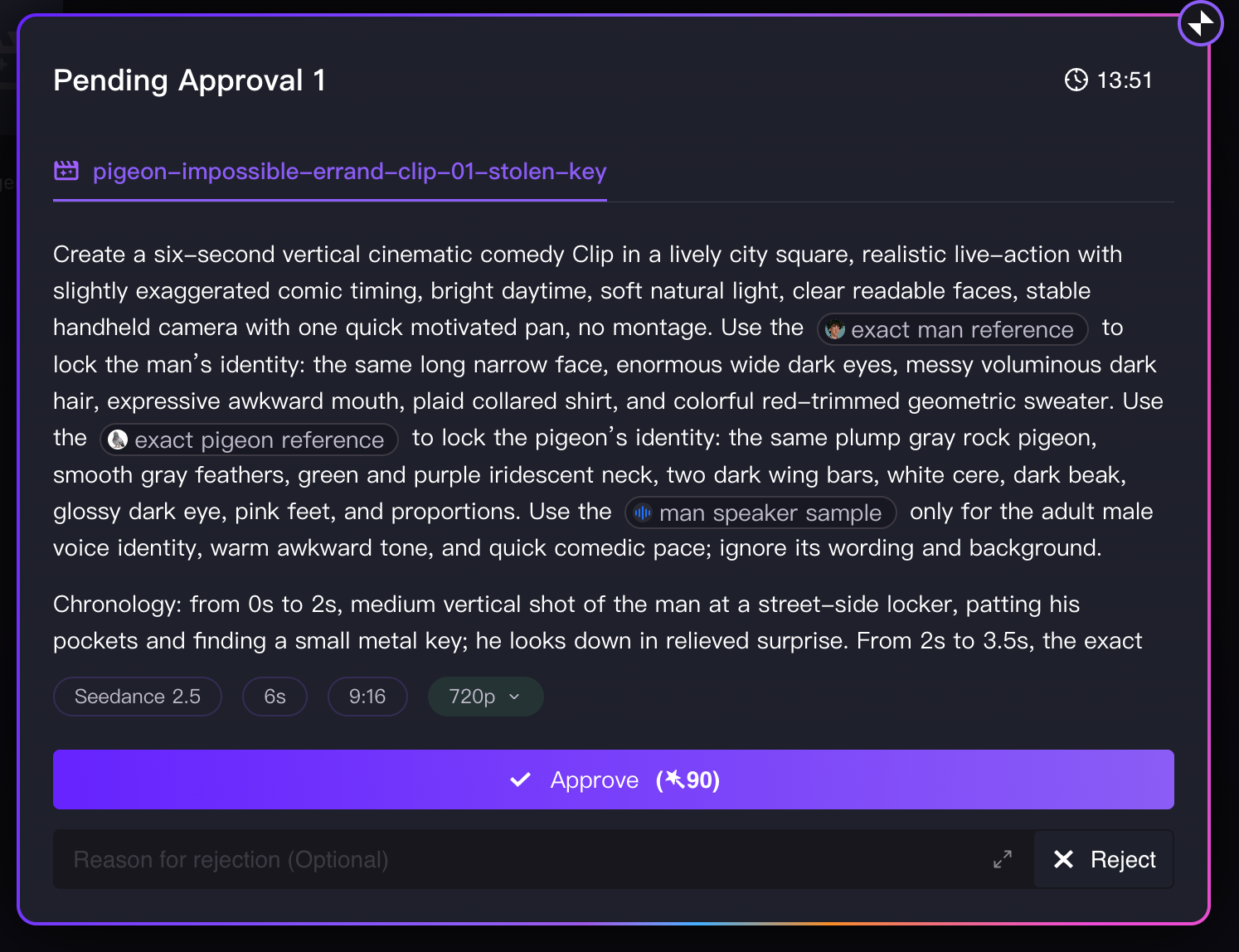
What the approval card shows
Before an eligible image, video, or audio task begins, the approval card shows the information MOVO AI will use for generation.
| Item | Description |
|---|---|
| Asset type | Whether MOVO is generating an image, video, or audio asset. |
| Generation request | A summary of what MOVO AI is about to generate. |
| Referenced assets | Characters, objects, scenes, or other existing assets that will be used as references, when applicable. |
| Output count | How many outputs will be generated. |
| Expected credit cost | The estimated number of credits required. |
| Generation settings | Model, duration, resolution, and other task-specific settings. |
Check the task before approving
Check the output quantity and displayed cost carefully. Approving locks the task and starts credit reservation. Click [Approve] to proceed or [Reject] to stop the action and revise your request.
Credit status states
Every generation task moves through four credit states:
Waiting for approval
Generation has not started. No credits have been deducted. You can still edit the request or cancel.
Approved and queued
The estimated credits are temporarily frozen or reserved while the task is processing. This prevents you from over-spending during a busy session.
Generation successful
The final credit charge is deducted from your balance. The output appears in the session.
Generation failed
The reserved credits are returned to your account. You keep the credits and can re-run or revise the task.
Next steps
Continue with the next part of the workflow:
Quick answers
What does a MOVO AI approval card show?
The asset type being generated, a task summary, the number of outputs, the expected credit cost, and relevant generation details like model, duration, and resolution.
When are credits actually deducted?
Credits are reserved when a task is approved and queued, deducted when generation succeeds, and returned to your account if generation fails. Nothing is deducted while a task is waiting for approval.
What happens if a generation fails?
The reserved credits are returned to your account. You can then re-run the task or revise your request without paying twice.
Can I cancel a task before it starts?
Yes. Click [Reject] on the approval card while the task is still in the "Waiting for approval" state. No credits have been deducted, so you can revise and try again.
Get 100 free credits